

Smart Outdoor Grill Features: What Matters Most in 2026
What if a grill’s most impressive feature isn’t the one that makes dinner easier? The smart features in modern outdoor grills can help you monitor food, manage temperature, and spend less time tending the cook, but their value depends on how you actually grill.
App controls, connected probes, and automated settings can sound like shortcuts to better results. To judge their value, look at what each function does in practice. Does it help you keep track of food while hosting, follow a longer cook, or simplify a routine you already enjoy? Comparing features by the task they support is more useful than assuming more technology is automatically better.
This guide explains common smart-grilling functions and how to prioritize them around your cooking habits and household needs. It also covers how connectivity and controls fit into the wider built-in grill decision, alongside kitchen layout and long-term plans. The goal is a setup with features that suit the way you cook.
Key Takeaways
- Evaluate smart features in modern outdoor grills by the cooking task they support, not by the technology label alone.
- Compare monitoring, alerts, app controls, and guided cooking according to the decisions you want help making at the grill.
- Prioritize features around your usual meals, hosting style, and preferred level of hands-on control.
- Consider how grill controls and connectivity fit the outdoor kitchen’s layout and intended workflow.
- Use verified, model-specific information to weigh convenience against reliance on apps or connectivity.
How Smart Grill Features Improve Everyday Cooking
Smart grill features support monitoring, control, or guidance during grilling. They may help you follow a cook while greeting guests, check temperature information from a connected device, or follow prompts as part of a familiar routine. The exact functions depend on the grill model, so the label “smart” alone doesn’t tell you what it can do.
Technology can add convenience, but it doesn’t determine cooking performance by itself. Results still depend on the grill’s design, heat management, the food, and the cook’s technique. Understanding traditional grilling methods helps put connected functions in context: they can support decisions during a cook, but they don’t replace grilling fundamentals.
What makes an outdoor grill smart?
Common categories include temperature information, connected controls, alerts, and guided cooking. A function may be built into the grill or come from a separate connected accessory. That difference matters: an accessory may provide a specific type of monitoring without making the grill’s other controls app-enabled. Review the model’s documentation to see which functions are integrated, what they do, and what equipment or connection they require.
Where smart functions can make a difference
Monitoring may help you divide your attention during a gathering. Instead of staying beside the grill throughout a cook, you may be able to check available temperature information while preparing sides or talking with guests. Alerts can draw your attention to a change or prompt, but they don’t confirm that food is ready or cooked as intended. Treat them as one source of information, alongside your own judgment.
The practical value often comes with repeated use. If you cook similar meals regularly, relevant readings or prompts may help you follow a familiar routine and plan when to check the food. If you rarely use connected functions, straightforward controls may be a better fit.
As you compare built-in grill options, consider the cooking experience and the technology together. Ask which information would be useful, where you’ll access controls, and how the grill fits into the kitchen’s workflow. Base your comparison on verified details for each model, not assumptions about what a feature label means.
Explore the Smart Grill Features That Shape Control and Convenience
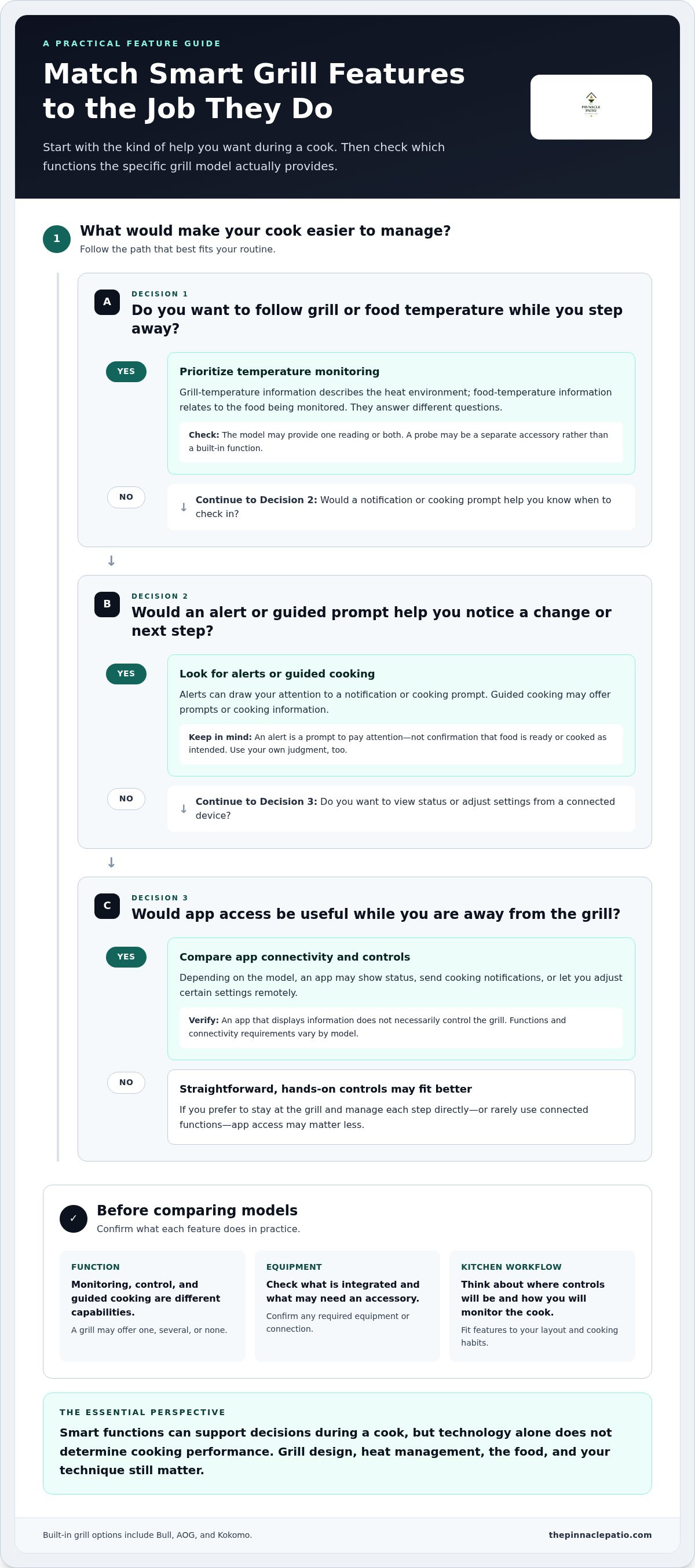
A useful way to compare smart features in modern outdoor grills is to start with the homeowner need each one addresses. Some functions provide information, others let you interact with grill settings, and some offer prompts during a cook. They may work together, but they aren’t interchangeable.
Monitoring shows information, control lets you change settings, and guided cooking offers prompts about what to do next. A grill may offer one of these functions, several, or none. Check the product documentation to confirm what a specific model supports.
Temperature monitoring, probes, and cooking guidance
Temperature information can help you follow a cook without repeatedly lifting the lid. Depending on the model and equipment, a grill may report its cooking temperature, food temperature through a probe, or both. These readings answer different questions: one concerns the heat environment, while the other relates to the food being monitored.
Guided cooking is a different kind of support. It may provide prompts or cooking information, but don’t assume every grill includes a probe, the same number of probe inputs, or identical guidance. Check which functions are built in and whether a separate accessory is required.
App connectivity, alerts, and remote control
When a grill connects to an app, available functions may include viewing status, receiving cooking notifications, or adjusting settings remotely. These capabilities vary by model. An app that displays information doesn’t necessarily let you control the grill, and an alert is a prompt to pay attention, not confirmation that food is ready.
Consider how you cook. If you often host and step away to prepare food or spend time with guests, checking available information on a connected device may suit your routine. If you prefer to stay at the grill and manage each step directly, app access may matter less. Connectivity requirements and app functions also differ, so review the model’s documentation before factoring them into your kitchen plan.
For a built-in grill, think about where the controls will be within reach and how monitoring fits into your outdoor kitchen workflow. The Pinnacle Patio offers built-in grills from brands including Bull, AOG, and Kokomo. Continue planning your grill configuration with those layout and feature priorities in mind.
Compare Smart Grill Features by the Cooking Problems They Solve
Rather than count features, start with the moments you’d like to manage more easily. Smart features in modern outdoor grills may support different tasks, from checking a longer cook’s progress to receiving a reminder while you prepare dinner. Their usefulness depends on your routine and on the specific functions a model provides.
| Feature category | Practical benefit | Homeowner consideration |
|---|---|---|
| Monitoring | Provides available grill or food temperature information during a cook. | Consider which readings matter for your usual meals and how you’ll view them. |
| Alerts | Can draw attention to a notification or cooking prompt. | Alerts support awareness, but still require your judgment and attention. |
| App controls | May let you view status or adjust certain settings through a connected device. | Check which controls are accessible remotely and what connectivity they require. |
| Guided cooking | May provide prompts or information to help structure a cooking routine. | Decide whether guidance suits your experience and preferred level of control. |
Which features matter for your cooking style?
For a longer cook, monitoring and progress information may be useful if the grill or compatible equipment supports them. This can help you stay aware without making repeated checks the focus of the afternoon. For quick weeknight grilling, straightforward controls and clear status information may matter more than a broad set of connected tools.
Frequent hosts may also want to consider shared usability. If household members take turns cooking, familiar controls and clear status information can make handoffs easier. Alerts or app access may help someone keep track while preparing sides or welcoming guests, but they aren’t a substitute for attending to the grill.
When connectivity adds value, and when simplicity is enough
Think about whether you’ll regularly check an app, respond to alerts, or use guided prompts. Consider whether everyone who uses the outdoor kitchen is comfortable with connected devices and whether several people will need to interact with them. If those functions would go unused, a simpler interface may be the better fit.
Assess the grill as a whole. Connectivity can complement the grill’s design and your cooking judgment, but it can’t replace choosing an appliance suited to your kitchen, cooking needs, and intended workflow. Prioritize functions you’ll use, then compare specific models using their product information.
Plan Smart Grill Features Around Your Built-In Kitchen
Smart features in modern outdoor grills are most useful when they support both your cooking routine and the way your kitchen is arranged. Plan the appliance and its controls as part of one working space, rather than choosing technology first and adapting the layout around it.
- Define your cooking habits. Note what you prepare, how often you host, and when you’d want to monitor a cook.
- Prioritize functions. Decide whether temperature information, alerts, app access, or guided prompts would help in practice.
- Compare grill options. Match your priorities to verified, model-specific product details.
- Plan the kitchen. Consider control access, connectivity, counter space, and the sequence of tasks around the grill.
Dimensions, utility needs, clearances, and compatibility vary by model. Use verified product information to coordinate the grill with the intended kitchen configuration, rather than assuming one model’s requirements apply to another.
Match grill controls to the outdoor-kitchen layout
Picture where the cook will stand, the path between the grill and prep space, and where guests are likely to gather. Controls should fit naturally into that workflow, while counter space should support the tasks you plan to do nearby. A screen or connected device is useful only if it’s easy to access where you’ll use it. Compare built-in grill options with your broader outdoor kitchen plans so the appliance and layout inform each other.
Use a practical checklist before comparing models
Before reviewing specifications, write down when added information or a notification would help. Identify the app and control functions you want, then compare those needs with each model’s documented capabilities. Keep the list focused on your routine, not the longest feature description.
- Which cooking tasks would benefit from monitoring or alerts?
- Do you want to view status, adjust settings, or both?
- Who will use the controls, and how should they fit into the cooking flow?
- What verified dimensions, utilities, clearances, and compatibility details shape the kitchen plan?
Use this list to focus your comparison on features and fit that matter in daily use.
Choose a Smart Built-In Grill with Confidence
The best choice isn’t necessarily the grill with the longest feature list. Smart functions can make it easier to stay aware of a cook or access certain controls, but app-based features may depend on connectivity and won’t suit every household. Start with what would improve your routine, then compare those needs with verified details for each model.
A final checklist for comparing smart outdoor grills
Before settling on a model, separate useful capabilities from appealing extras. Confirm what each grill supports through verified, model-specific product information, and assess the full built-in configuration alongside its smart functions.
- Monitoring and alerts: Identify which information or notifications would help with your regular cooking tasks.
- Controls and connectivity: Note whether you want app access, remote adjustments, or a straightforward on-grill interface.
- Grill fit: Compare verified details for size, fuel, compatibility, utilities, and kitchen requirements.
- Everyday use: Distinguish essential cooking needs from technology you may rarely use.
This keeps the decision grounded. A well-matched grill should work for the way you cook and for the space you’re planning, whether or not connected features are central to your routine.
Bring your grill and kitchen plans together
The grill is part of a larger outdoor kitchen, so consider how its controls, monitoring options, and physical configuration will serve the space over time. Think about who will use it, how it fits into meal preparation, and whether its functions remain practical in your planned layout. Bull, AOG, and Kokomo are among the built-in grill brands available through The Pinnacle Patio. Evaluate each specific model by its documented capabilities rather than assuming features are shared across a brand.
Explore built-in grill options as you consider how the appliance fits your wider plans. For details on sizing, compatibility, configuration, and design, continue planning your outdoor kitchen.
Choose Features That Fit the Way You Cook
The smart features in modern outdoor grills are most valuable when they solve a familiar cooking need, whether that means checking progress, receiving an alert, or accessing a control. Prioritize functions you’ll use and compare them with verified details for each model. Connectivity can add convenience, but it doesn’t replace choosing a grill that fits your cooking habits and outdoor kitchen.
The Pinnacle Patio’s built-in grill selection includes Bull, AOG, and Kokomo. Weigh each model’s documented capabilities alongside sizing, compatibility, configuration, and design needs.
Explore The Pinnacle Patio’s built-in grill collection to compare options for your outdoor kitchen.
With a clear sense of what matters to your household, you can plan an outdoor kitchen that feels practical, cohesive, and ready for shared meals.
Frequently Asked Questions
What are smart features in modern outdoor grills?
Smart features in modern outdoor grills are technologies that help you monitor, control, or receive guidance during cooking. Depending on the model, they may include temperature information, app connectivity, alerts, or guided cooking prompts. These functions aren’t standard across all grills, and their operation can differ. Compare verified product details and consider whether each feature supports the way you cook and host, rather than assuming it comes with every grill.
Are smart grill features worth it?
Smart grill features can be worthwhile if they address a recurring need, such as checking cooking progress while hosting or receiving useful status updates. They may matter less if you prefer a simple, hands-on routine and don’t expect to use connected functions regularly. Identify the tasks you’d like help with, then compare them with a grill’s verified features. The goal is practical support, not technology for its own sake.
Can you control an outdoor grill with a smartphone?
Some grills or compatible accessories offer smartphone-based monitoring or control, but capabilities vary by product. An app may display cooking information, send notifications, or allow selected adjustments where supported. Check the specific model’s documentation for available functions and connectivity requirements. A connected grill doesn’t necessarily offer remote operation, and an app shouldn’t replace attention to the cooking process. Consider which tasks you’d actually want to manage from a device.
How do smart grill temperature probes work?
A temperature probe measures the temperature at the point it’s designed to monitor and, when supported, sends that information to a display or connected system. Some setups monitor food temperature, while others may provide information about grill conditions. The exact arrangement depends on the product. Review its documentation for probe compatibility and included components. Use readings as helpful guidance alongside appropriate food-handling practices and your own cooking judgment.
Do smart outdoor grills need Wi-Fi?
Not every smart-grill function necessarily requires Wi-Fi. Connectivity needs depend on the product and feature: some information may be available through local controls or another connection method, while remote app access may require a network. Product documentation should describe what each function needs. Before choosing, consider where the grill will be used and which capabilities you expect to access. Don’t assume Wi-Fi is required for every connected feature.
What should I compare when choosing a smart built-in grill?
Start with the cooking tasks you want technology to support, then compare verified monitoring, alert, app, and control functions. Assess the grill’s fit with your outdoor-kitchen plans using model-specific information for dimensions, fuel, utilities, and compatibility. Consider whether the household will find its controls intuitive and whether the features suit your routine. A considered choice balances everyday cooking needs, kitchen configuration, and technology you’re likely to use.